
Annotations and Selection
Select By Categories
Filter the active view by category, then pick elements of those categories.
When to use it
Use this when a view is crowded and you need only certain categories - doors, rooms, generic models - without building a selection filter.
Why it exists
Tab-select and crossing windows grab too much. Checking categories, hiding empty ones, then picking in the view is faster for targeted edits.
How to use it
-
Open Select By Categories
On the ✚ Annon App tab, click Select By Categories.
-
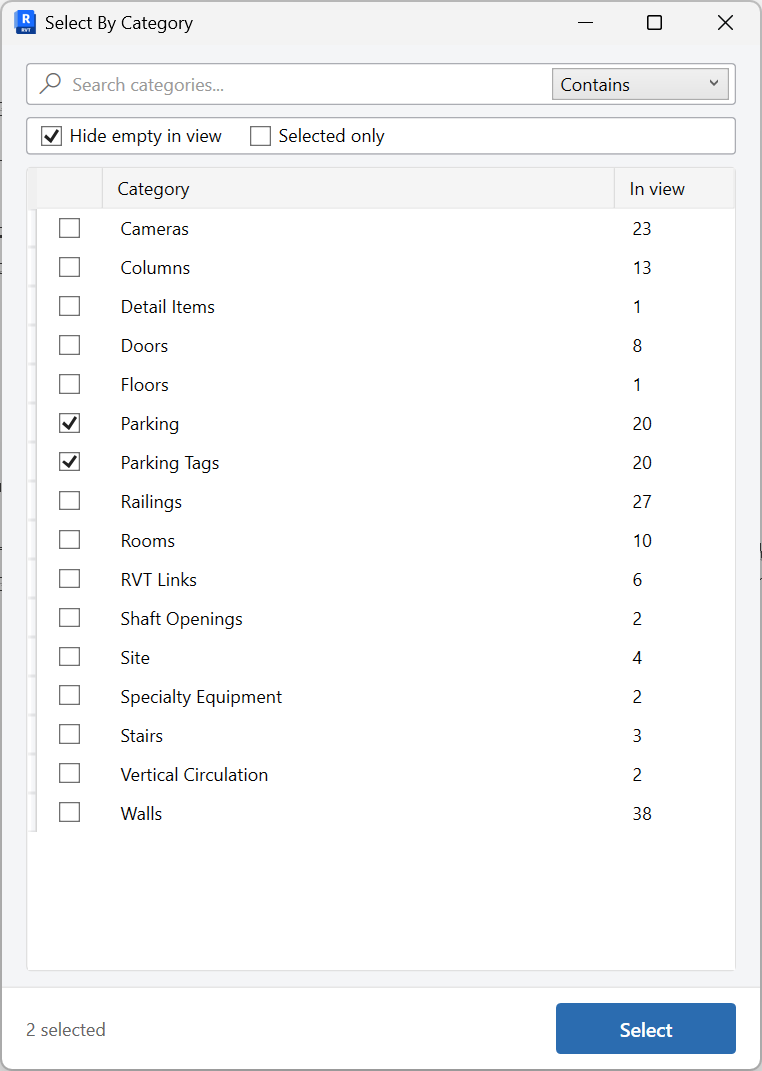
Check categories
Optionally Hide empty in view and limit to Selected only if you already have a preselection.
-
Select, then pick
Click Select, then pick in the view. The tool filters what you can grab to the checked categories.
Keep in mind
- Ribbon label is Select By Categories (plural).
- To grow a selection from one sample element, use Select Similar.
Related tools
 Select Similar
Select elements that match a picked sample by category, family, or type, in this view or the entire project.
Select Similar
Select elements that match a picked sample by category, family, or type, in this view or the entire project.
 Selection Box Plus
Create a 3D section box around the current selection, including linked elements, with an optional offset.
Selection Box Plus
Create a 3D section box around the current selection, including linked elements, with an optional offset.
 Parameter Values
Browse elements by parameter value in this view or the entire project, then select, isolate, color, or edit those values.
Parameter Values
Browse elements by parameter value in this view or the entire project, then select, isolate, color, or edit those values.